



The fastest path is an AI tool plus a 15-minute human review pass on your emotional scenes. But which tool, what settings, and exactly what to check? This guide gives you a complete, tool-agnostic workflow — from upload to publish — tested on real drama clips.
Written by the Short Drama Lab team
We translate short drama content across TikTok, YouTube Shorts, and Instagram Reels — covering romance, action, comedy, and drama genres in multiple language pairs. Every tool and workflow in this guide was tested on actual clips in February–March 2026, including scenes with fast dialogue, overlapping speakers, and heavy emotional beats.
Which method fits your situation?
- Testing reach→ Platform auto-translate (TikTok/YouTube) — free, instant, good enough to gauge audience interest
- Regular creator→ AI tool + quick review — best balance of speed, quality, and cost for most workflows
- Emotional / complex→ AI draft + native speaker review — adds cultural accuracy without paying full professional rates
- Licensed / official→ Professional service (Rev, Gengo, Viki) — certified output, broadcast-ready quality
4 Methods to Translate Short Drama Videos
Method 1: Platform built-in tools
YouTube, TikTok, and Instagram Reels all offer free auto-captioning and auto-translation. Upload your clip, enable captions, and the platform generates subtitles in 100+ languages within minutes — no setup required.
In our testing, accuracy on clean, straightforward dialogue was reasonable. Accuracy on dramatic scenes with emotional delivery, slang, or overlapping dialogue dropped significantly — often producing literal translations that sounded robotic or missed the tone entirely. Use this method to test whether a new language market is interested in your content before you invest in better translation.
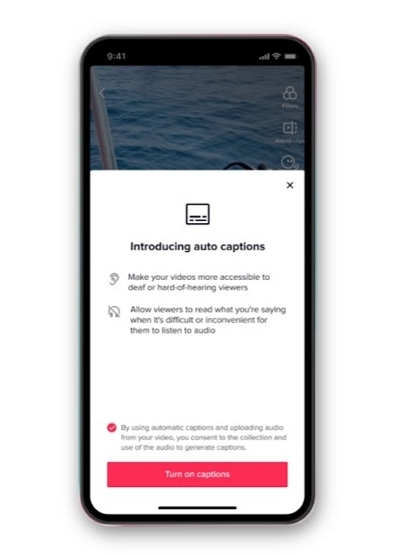
Pros: Free, fast, accessible to everyone
Cons: Limited accuracy, weak with emotional or idiomatic dialogue
You May Also Like
Method 2: AI-Powered Translation Tools
Dedicated AI tools such as Mediaio, VEED, Kapwing, and CapCut offer more than the built-in features available on most platforms. In addition to generating transcripts and translations, they can automatically match subtitle timing to spoken dialogue and, in many cases, create dubbed voice tracks. During our testing, these tools performed well with modern TV dramas, accurately handling everyday conversations, emotional scenes, and fast-paced dialogue. However, content that depends heavily on wordplay, cultural references, or older forms of language still benefited from manual review and editing.
Cost is typically $10–30/month for unlimited clips, making this the practical default for creators publishing regularly. The key difference between tools is dubbing quality — if you want voiced translations rather than subtitles, test a few clips on free trials before committing.
Pros: Fast, affordable, good for emotional/dramatic content, supports dubbing
Cons: May need manual review for cultural nuances
Method 3: Professional Translation Services
Run the clip through an AI tool for the initial translation, then hire a native speaker for a focused 1–2 hour review. On Fiverr or Upwork this costs $15–40 per clip. You get near-professional accuracy at a fraction of full professional rates. This is what we use for emotionally pivotal scenes, comedy, or any content where cultural nuance matters for audience retention.
Pros: High accuracy, strong cultural adaptation, reliable for sensitive content
Cons: Expensive, slower turnaround
Method 4: Hybrid Approach
Agencies like Rev, Gengo, and Viki employ translators who specialise in media content and understand drama conventions. Accuracy is high; turnaround is 3–7 days; cost is $100–500 per video. Right for licensed releases, branded content, and anything requiring certification — not practical for creators publishing daily.
Side-by-side comparison
The Translation Workflow: Step by Step
This workflow applies regardless of which tool you use. Steps 1–3 are universal preparation; Steps 4–7 walk through the full Mediaio Video Translator workflow as the recommended tool for most creators.
Before You Upload: Prepare Your Audio
AI translation accuracy depends heavily on audio clarity. Background music mixed into the dialogue track at high volume causes AI tools to miss speech boundaries, producing mistimed or missing subtitles. Fix this before anything else: export a dialogue-only mix if possible, or use a noise reduction tool to reduce background music. This single step improves output quality more than any tool setting.
Before You Configure: Decide on Subtitles or Dubbing
Subtitles are faster to produce and easier to review. Dubbing sounds more immersive but takes longer and costs more. For Spanish and Portuguese-speaking audiences, dubbing typically outperforms subtitles in retention. For English audiences watching foreign content, subtitles are standard and expected.
Recommendation: Start with subtitles. Test audience engagement. Only add dubbing to your top-performing clips once you've confirmed the language market responds.
Step-by-Step: Translating a Short Drama Clip with Mediaio Video Translator
Go to Mediaio Video Translator and upload your drama clip. Supported formats include MP4, MOV, and AVI.
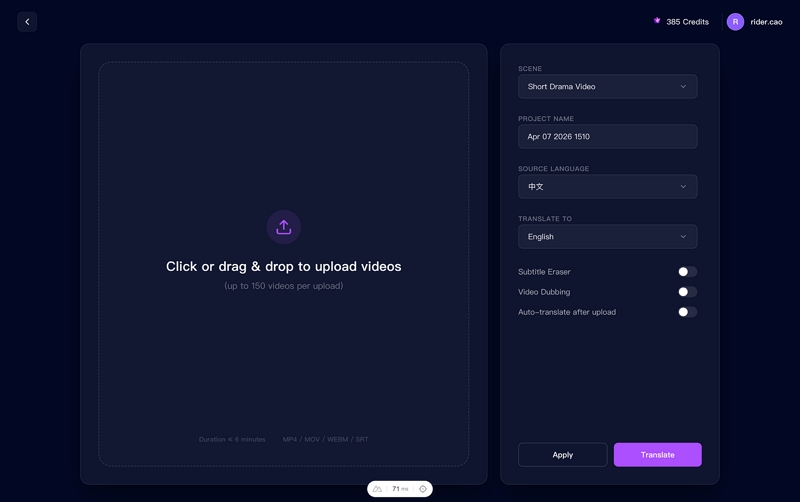
Set your source and target languages.
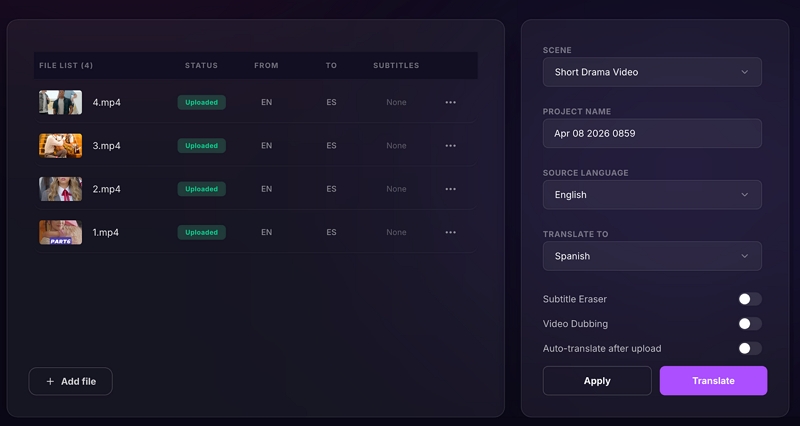
Once processing is complete (typically 5–10 minutes), Mediaio Video Translator opens an inline editing interface.
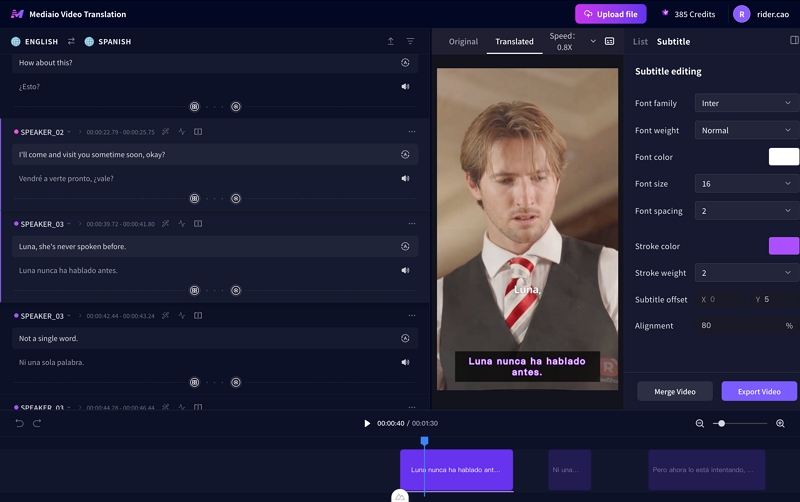
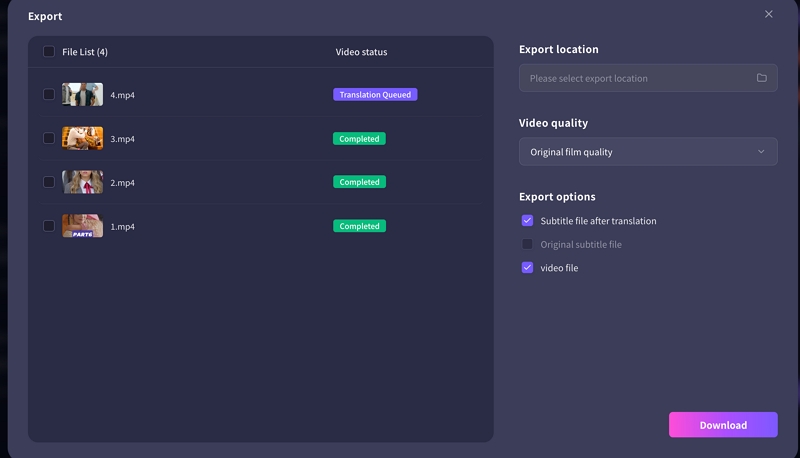
Export format depends on where you're publishing. YouTube accepts SRT uploads as a separate subtitle track (upload via YouTube Studio → Subtitles → Add language → Upload file), this keeps subtitles indexable by YouTube's search algorithm and lets viewers toggle them on or off. TikTok and Instagram Reels require burned-in subtitles embedded directly in the video, since neither platform supports external subtitle files. Export both versions if you're publishing across platforms. Before posting anywhere, watch the exported clip on your phone: subtitle text that looks fine on a laptop often overlaps or becomes unreadable on a 6-inch screen, especially during fast exchanges.
The four challenges that break most translations
These are the specific failure points we encountered most frequently in testing. Each has a concrete fix, not a vague suggestion.
Challenge 1: Slang and colloquialisms
Short drama translations often run into issues that weaken emotional impact or confuse viewers, especially when scenes move quickly. Slang and colloquialisms are one of the biggest hurdles because they rarely translate word for word.
Solution: Use localized equivalents.
The most effective solution is to replace them with localized equivalents that carry the same tone and social meaning. A phrase like “Don’t ghost me” may need a culturally familiar alternative rather than a literal translation.
Challenge 2: Emotional dialogue loses impact.
Emotional dialogue can also lose intensity when translated too literally.
Solution: Prioritize tone over literal translation.
Dramatic scenes depend on rhythm, tension, and character chemistry, so the priority should be tone rather than exact wording. Choosing shorter, sharper lines for confrontations or softer phrasing for vulnerable moments helps preserve the original mood.
Challenge 3: Text too long for quick scenes
Short dramas often feature rapid exchanges, so long translated lines won’t fit on screen.
Solution: Condense while keeping meaning.
Condensing text while keeping the core meaning ensures subtitles remain readable without disrupting pacing. This may involve trimming filler words or splitting lines across beats.
Challenge 4: Multiple speakers
Multiple speakers talking at once is another common challenge.
Solution: Color-coded subtitles or labels
Color coded subtitles, speaker labels, or staggered timing help viewers follow the conversation without confusion. These techniques are especially useful in arguments, comedic overlaps, or ensemble scenes.
Subtitle styling for drama content
Styling affects whether viewers can actually read your subtitles — especially on mobile. These rules come from testing across TikTok, YouTube Shorts, and Instagram Reels:
Font: bold sans-serif, not decorative
Clean fonts like bold Helvetica or Noto Sans read best on compressed mobile video. Decorative or script fonts fail at small sizes. If your tool lets you choose, bold sans-serif is the right call every time.
Color: white text with dark outline or semi-transparent background
White text on bright scenes becomes invisible. Add a black outline (1–2px) or a semi-transparent dark background box behind the subtitle. This works across bright and dark scenes equally.
Position: bottom-centre by default, top for dubbed versions
Bottom-centre is the standard for subtitled content. If you've used voice dubbing, consider top placement so subtitles don't cover facial expressions during emotional scenes.
Line length: 42 characters max per line on mobile
Anything longer wraps awkwardly or gets cut off. Count characters, not words. "I don't want to talk about this right now" is 42 characters — that's the ceiling.
Mistakes that hurt more than bad translation
1. Translating without reviewing any scenes
AI generates a complete subtitle file — it feels done. Publishing without reviewing even the emotional peak scenes is the single biggest quality failure we see. It takes 10 minutes to check three key scenes. Do it every time.
2. Using the same subtitle style across all target languages
German lines are significantly longer than English equivalents. Spanish often needs more words than Mandarin for the same idea. Your font size, line breaks, and timing may need adjusting per language — not just per clip.
3. Translating a clip with noisy audio and expecting clean output
Every AI tool is limited by audio quality. Background music above dialogue level, wind noise, and low-bitrate audio all degrade transcription accuracy before translation even starts. Fix audio first.
4. Inconsistent character names across episodes
"Xiao Wei" in episode one becoming "Wei Wei" and then "Little Wei" across a series confuses viewers and hurts retention. Lock character name formats before translating episode one, then keep a reference document for the full series.
5. Checking subtitles on desktop only
Short drama audiences watch on phones. Subtitle readability, timing, and line breaks look very different on a 6-inch screen than on your editing monitor. Final check on mobile, every time.
One extra check worth doing: After publishing, check your first 20–30 comments in the new language. Native speakers will tell you immediately if something sounds off, this feedback loop is faster and more accurate than any internal review process.
Common questions
With an AI tool: 15–25 minutes total — roughly 10 minutes for AI processing and 10–15 minutes for your review pass on key scenes. With the hybrid method (AI + human reviewer): add 1–2 days for the reviewer's turnaround. Professional services add 3–7 days. For a series, the hybrid and professional timelines compress once reviewers become familiar with the characters and tone.
It depends on the target market. Spanish- and Portuguese-speaking audiences, especially in Latin America, tend to engage more with dubbed content. English-speaking audiences consuming foreign-language drama expect and accept subtitles. French and German audiences are split. Test both formats on your highest-performing clip before building a full dubbing workflow. Poor dubbing (robotic voices, mistimed audio) hurts retention more than subtitles, so only switch to dubbing when your tool can produce natural-sounding output.
Almost always audio quality, not the tool. AI tools calculate subtitle timing from speech detection. Heavy background music makes it hard for the tool to identify where speech starts and ends, pushing everything slightly late. The fix: reduce background music volume in the source file before uploading, or use a tool with a manual timeline editor (VEED.io has a good one) to shift all subtitles together as a block rather than adjusting them individually.
Keep the original romanised pronunciation for character names. Don't translate them. Do translate titles and forms of address contextually, a character called "总裁" (zǒngcái) should appear as "CEO" or "Director," not as a romanisation that means nothing to your target audience. On a character's first appearance, add a brief identifier: "(Maya — the company's head of legal)" and then just "Maya" from that point forward. Viewers adapt quickly to unfamiliar names; inconsistency is what creates confusion.
Check your existing analytics before choosing. YouTube Studio and TikTok both show you country-level data for views that didn't come from your primary language audience. If you're seeing meaningful traffic from Brazil without any Portuguese content, that's your signal. As a general starting point: Spanish (largest reach for most creators), Brazilian Portuguese (high engagement with drama content), and Hindi (fast-growing short-form audience) consistently outperform other language markets for drama genres — but your own data should drive the decision.
Conclusion
Translation quality lives or dies in three places: audio clarity before you upload, your review of emotional peak scenes after AI processing, and subtitle readability on a phone screen before you publish. Get those three right, and the choice between an AI tool, a hybrid workflow, or a professional service becomes far less important than most people assume.
Start with one clip, one language, and one target market. Measure the response. Then scale what's working rather than translating everything at once into languages your audience data doesn't yet support.