



Want to reach global audiences but can't afford $500+ per video for professional voice actors? AI dubbing has changed the math entirely. In 2026, you can dub a drama video into Spanish, Portuguese, or Hindi in under 20 minutes—with emotion preserved, lip-sync included, and voices that sound 95% human.
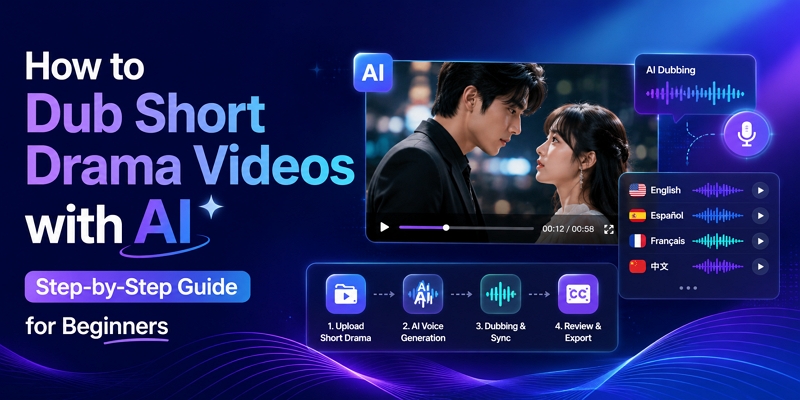
This guide covers the complete workflow: which tool to use, how to configure it for drama content specifically, how to handle the challenges that trip up most creators, and how to scale once you've confirmed a language market responds to your content.
Quick Answer: Which Tool Fits Your Situation?
- Best overall → Mediaio Video Translator — emotion preservation, lip-sync, voice cloning, $9.99/month
- Best free option → CapCut — fast, no cost, acceptable for casual TikTok content
- Best voice realism → ElevenLabs — highest quality output, but audio-only (no video sync)
- Best lip-sync → HeyGen — adjusts mouth movements in the video itself
The core AI dubbing pipeline, regardless of tool:
Upload video → AI transcribes → Translates → Voice clones → Syncs audio → Export
Why AI Dubbing Beats Traditional Methods for Drama Creators
The gap between traditional and AI dubbing has closed dramatically. Here's the practical comparison for independent creators:
Tool Comparison: Which AI Dubbing Tool Is Right for You?
1. Mediaio Video Translator - Best Overall for Drama
Price: $35.95/month | Languages: 100+ | Quality: 9/10 | Time: 10–15 min
Mediaio Video Translator is the strongest all-round option for drama content specifically because it addresses the failure points that matter most: emotional flatness, multi-speaker confusion, subtitle removing, and cultural idiom loss. In our testing, it was the only tool that consistently preserved emotional register across crying, whispering, and argument scenes without manual adjustment on every line.
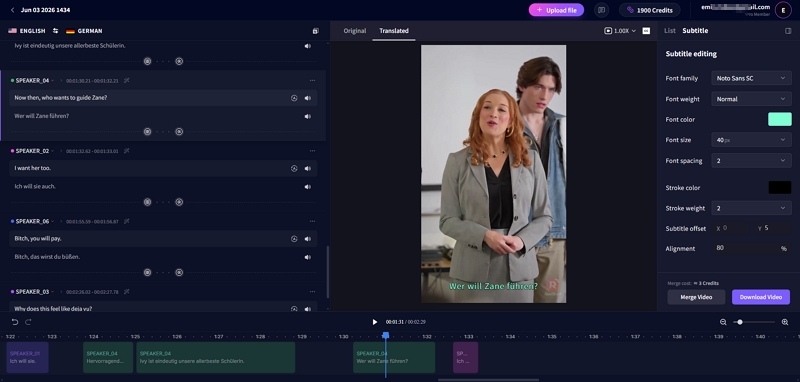
Drama-specific capabilities:
- Emotion-aware voice cloning — preserves crying, anger, and whispers without sounding robotic
- Auto lip-sync — analyzes lip movement and aligns dubbed audio precisely
- Subtitle remover — erase the original subtitles while completing the voiceover and subtitle translation.
- Cultural adaptation mode — translates idioms and metaphors by meaning, not literally
- Batch processing — dub an entire series into multiple languages without re-uploading
Pros
- Best balance of quality, speed, and price.
- Drama-optimized emotion detection.
- Much more convenient for subtitle editing and redubbing.
Cons
- Heavy accents need manual review.
- Extreme screaming approximately 85% accurate.
Best for: Web series, YouTube drama, TikTok content, indie productions
You May Also Like
2. ElevenLabs Voice Dubbing
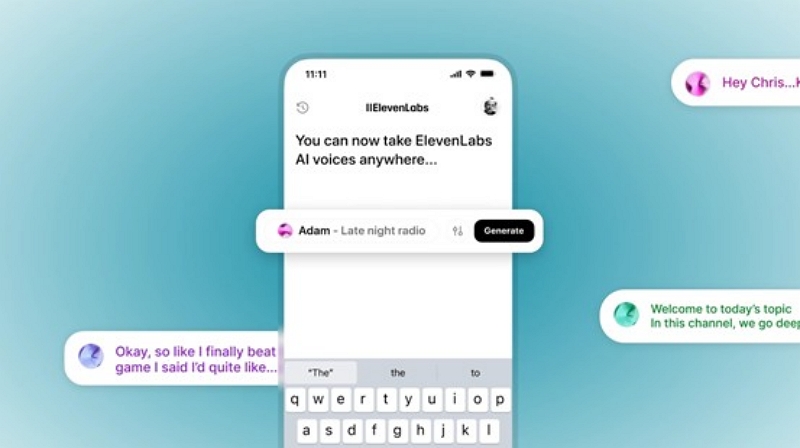
Price: Free tier / $22–99/month | Languages: 32 | Quality: 10/10
The best voice realism of any tool we tested—industry-leading naturalness, custom voice cloning from a 1-minute sample, and emotion control sliders for fine-tuning specific lines. The significant limitation: ElevenLabs outputs audio only. You'll need to manually sync the dubbed audio to your video in a separate editor, which adds 30–60 minutes per clip and requires basic video editing skills.
Best for: High-budget productions where voice quality is non-negotiable and you have the editing workflow to handle audio-only output.
3. HeyGen AI Dubbing
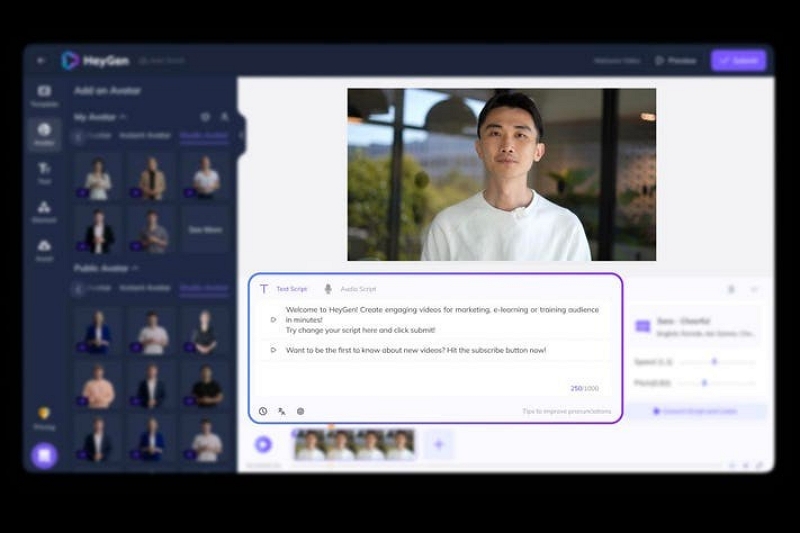
Price: $29–149/month | Languages: 40+ | Quality: 8.5/10
HeyGen's distinctive feature is visual lip manipulation—it adjusts the character's mouth movements in the video itself to match the dubbed language, not just the audio timing. This produces the most convincing result for close-up dialogue scenes where lip-sync is clearly visible. Less useful for wide shots or scenes where faces aren't clearly on camera.
Best for: Close-up dialogue-heavy content, talking-head drama, any scene where lip mismatch would be immediately obvious.
4. CapCut (Free Option)
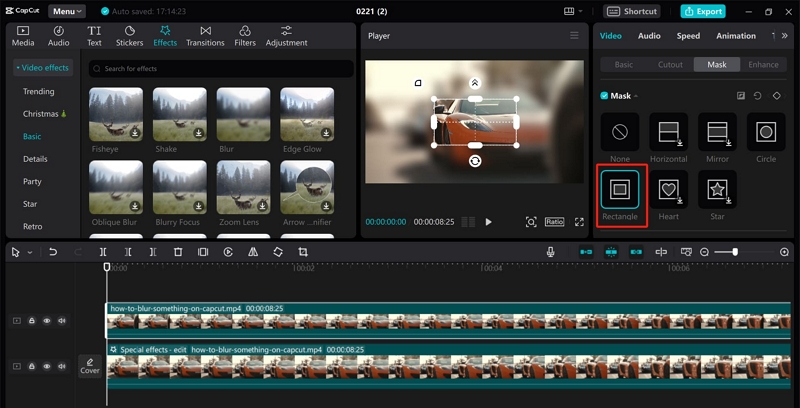
Price: Free | Languages: 15+ | Quality: 6.5/10
CapCut's workflow is straightforward: auto-captions → translate → text-to-speech dubbing. The output is robotic by drama standards—minimal emotional expression, flat delivery on intense scenes. Acceptable for casual TikTok content where production value is lower; not appropriate for content where emotional authenticity matters to viewer retention.
Best for: Quick tests, casual short-form content, verifying a language market exists before investing in better tools.
Step-by-Step: Dub Your First Drama Video with Mediaio
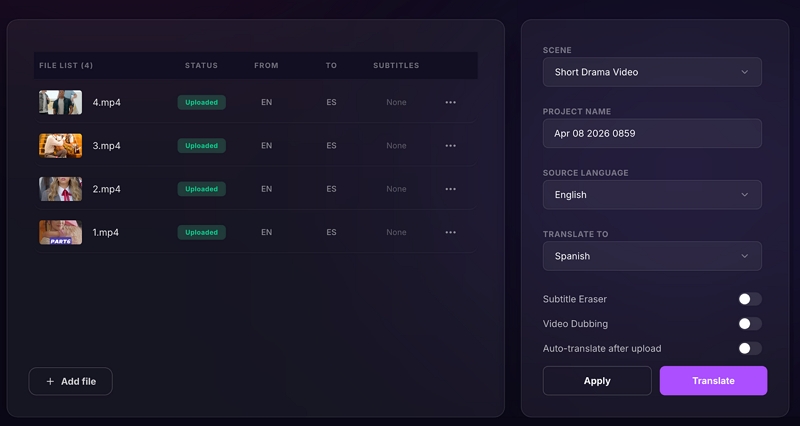
The following walkthrough uses a 5-minute drama scene being dubbed into Spanish as the working example. Total time: approximately 20 minutes.
Before uploading anything, address audio quality. This is the single most impactful step in the entire workflow—clean source audio produces 95% AI accuracy; audio with background music mixed into the dialogue track produces approximately 70%. If possible, export a dialogue-only mix. If not, use a vocal isolation tool (lalal.ai or Ultimate Vocal Remover are both free) to separate dialogue from background music before uploading. Also confirm your export settings: MP4, 1080p, with 2–3 characters maximum for your first project to keep voice assignment manageable.
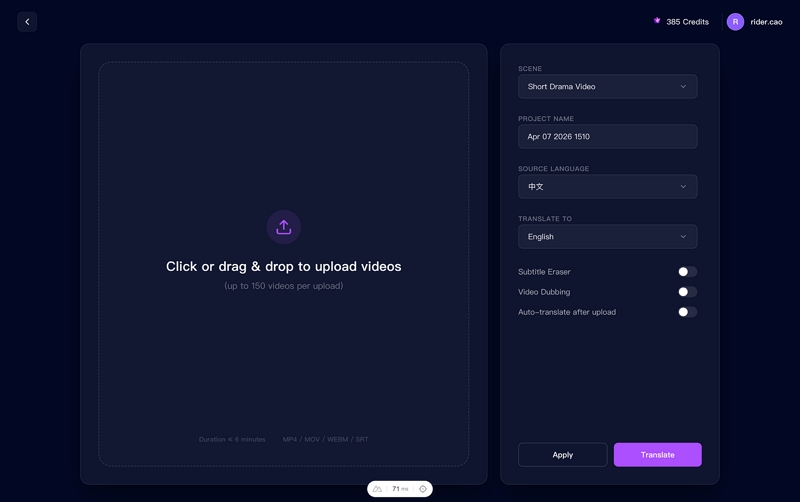
Set your source language (auto-detect works reliably for major languages) and target language. For Spanish, decide upfront whether you're targeting Latin American or European Spanish—they differ enough that a single dub may not feel natural to both audiences. In translation mode, always select Cultural Adaptation rather than Literal for drama content; this is what prevents idioms like "eating vinegar" from appearing as literal nonsense in the output. For voice configuration, choose between cloning the original actors' voices (recommended for series continuity) or selecting from Mediaio's AI voice library. Enable lip-sync mode before processing.
Mediaio's speaker diarization automatically detects and separates individual speakers. Review the auto-detected character assignments before confirming—misattribution here causes the most frustrating output errors and they're hard to catch after processing. Assign a distinct AI voice to each character, matching age, gender, and personality where possible.
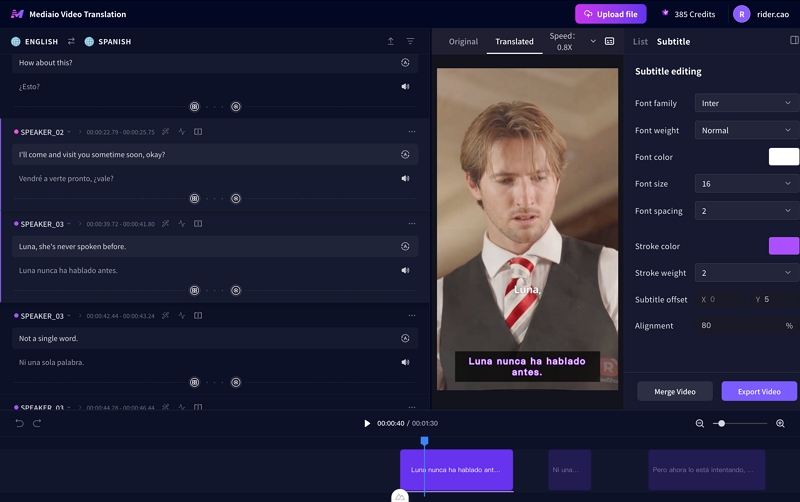
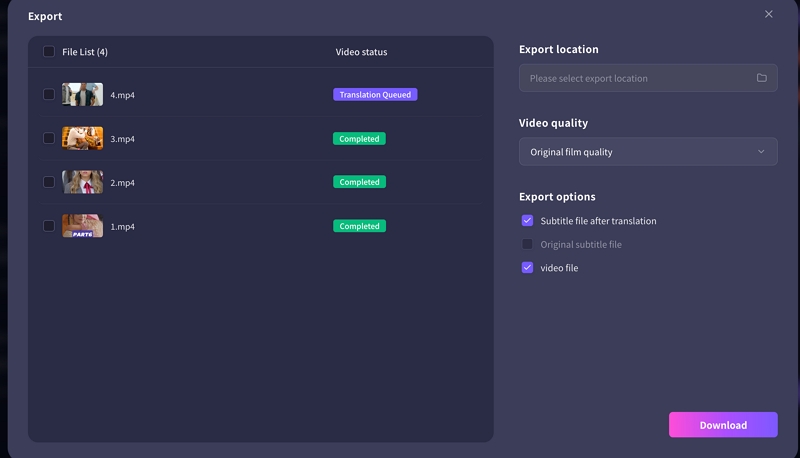
Don't watch the full dubbed video straight through—you'll miss things. Instead, seek out the three scene types where AI dubbing most commonly fails: emotional peaks (confession, argument, breakdown), multi-speaker exchanges where attribution can drift, and any lines you know contain idioms or cultural references. For any scene that sounds flat, click the timestamp and increase the emotion intensity slider by 20–40%. Once satisfied, export the dubbed video with Spanish audio replacing the original. Download both the dubbed video and the original audio track—you'll want the original for reference and potential future use. Publish the dubbed version separately on each platform with a Spanish-language title and description.
Drama-Specific Challenges and How to Fix Them
Drama content presents failure modes that don't appear in simpler video types. These are the five problems we encountered most often in testing, with concrete fixes for each.
Challenge 1: Emotional Scenes Sound Robotic
Why it happens: Standard AI mode prioritizes speech clarity over emotional nuance. The AI smooths out voice breaks, trembling, and breath patterns that are actually carrying emotional information in the original performance.
Fixes: Switch to Mediaio's Premium mode, which uses an emotion detection algorithm rather than the standard speech synthesis pipeline. Add emotion markers to your script before processing ([CRYING], [ANGRY], [WHISPER])—these directly instruct the voice synthesis engine. If the output is still flat, increase the emotion intensity slider by 20–40% on the specific lines. If a character's voice just isn't conveying the right emotion, try a different voice from the library; some AI voices handle certain emotional registers better than others.
Challenge 2: Multiple Characters Given the Same Voice
Why it happens: Speaker diarization fails when dialogue overlaps, voices are similar in pitch, or the audio quality makes it difficult to distinguish speakers.
Fixes: Review Mediaio's auto-detected speaker assignments before processing rather than after. If two characters have been assigned the same voice, manually reassign one before running synthesis. For ongoing series, save each character's voice ID in Mediaio so the assignment carries through to future episodes automatically.
Challenge 3: Lip-Sync Doesn't Match
Why it happens: Language length differences are the primary cause—Spanish is typically 15–20% longer than English for equivalent content. The extra words don't fit the original mouth movements.
Fixes: Enable lip-sync mode in Mediaio (auto-adjusts timing within the available mouth movement window). Enable concise translation mode, which instructs the AI to preserve meaning while using fewer words. Accept that wide shots don't need perfect lip-sync—prioritize accuracy in close-ups where mouths are clearly visible and deprioritize wide shots where minor drift won't be noticed.
Challenge 4: Cultural References and Idioms Lost in Translation
Why it happens: Literal mode translates words rather than meaning. Idioms, food metaphors, and culturally specific expressions produce nonsensical output when translated word-for-word.
Fixes: Always use Cultural Adaptation mode in Mediaio rather than Standard/Literal. This translates "吃醋" (literally "eat vinegar") as "he's jealous" and "break a leg" as its target-language equivalent. For idioms that cultural adaptation mode still misses, flag them during your review pass and rewrite them manually in Mediaio's inline editor. Build a running glossary as you work through a series—the same expressions recur constantly in romance and CEO drama genres.
Challenge 5: Background Music Interferes with Dubbing
Why it happens: AI voice synthesis needs clean dialogue as its input. When background music is mixed into the dialogue track, the AI can't cleanly separate what it should be replacing.
Fixes: Pre-process your audio before uploading: strip or significantly reduce the background music track before dubbing, then remix the original music back in after voice synthesis is complete. This produces the cleanest result. If you can't separate the tracks at source, use lalal.ai or Ultimate Vocal Remover (both free) to isolate dialogue before uploading to Mediaio.
Best Practices for Consistent Quality
Match voice characteristics to character.
Age, gender, energy level, and regional accent all affect whether a dubbed voice feels right for a character. Before committing to a voice for a full series, generate a 30-second sample with three different options and choose the best match. Use the same voice across all episodes—consistency is as important as quality.
Optimize source audio before you record, not after.
Use lavalier or lapel microphones on actors where possible; record in quiet environments; keep music and dialogue on separate tracks. Clean source audio produces 95% AI accuracy. Audio with significant background noise produces approximately 70%—and no post-processing fully recovers that gap.
h3>Expand to new languages based on your analytics, not assumptions.YouTube Studio and TikTok both show country-level view data. If you're seeing meaningful traffic from Brazil without any Portuguese content, that's your signal to dub. As a general starting point: Spanish (500M speakers, highest ROI for most creators) → Brazilian Portuguese (215M, high drama engagement) → Hindi (600M, fast-growing short-form audience). But your data should drive the sequence.
Use the QA checklist before every publish:
- Voice gender matches character throughout
- Emotional intensity matches the original scene
- No awkward pauses or audio cut-offs at line boundaries
- Lip-sync acceptable in close-up shots
- Character names pronounced correctly
- Native speaker reviewed for idioms and cultural references (Fiverr, $10–20)
Quality scoring before publishing: Voice naturalness 8+/10, Emotion accuracy 8+/10, Lip-sync 7+/10 (close-ups) / 5+/10 (wide shots), Overall 8+/10 to publish.
Real Results: What Happens When You Dub Drama Content
Case Study 1: YouTube Drama Series (@IndieMiniFlix)
Romance drama, originally English-only, averaging 50K views per episode. Dubbed into Spanish, Portuguese, and French using Mediaio ($12.99/month). Results after 3 months: Spanish version 180K views/episode (+260%), Portuguese 95K (+90%), French 60K (+20%). Total views across all languages: 385K per episode (7.7x original). Monthly revenue: $800 → $3,850. Time investment: 20 minutes dubbing per episode. Creator comment: "Our Spanish version now outperforms the English original."
Case Study 2: TikTok Short Drama Creator
Strategy: dub top-performing viral videos into 5 languages. Top video had 500K views in English; the French dub reached 2.1M views and drove 150K new followers. Viewer comments in French indicated they assumed the content was originally produced in French.
Case Study 3: Wedding Videography Business
Added bilingual ceremony videos as a service—original video plus Spanish dubbed version at $300 upcharge. Cost: Mediaio subscription at $12.99/month. At 10 weddings per month, this generates $2,900 in additional monthly revenue from content that already existed.
Common factors across all three cases: started with one target language, focused on emotional content (Mediaio's strongest output), had a native speaker review before publishing, and promoted dubbed versions as separate content rather than replacing the original.
Your Action Plan
Today (30 minutes): Sign up for Mediaio's free trial. Choose your best-performing drama video. Dub it into Spanish—the largest market and highest ROI starting point for most creators.
This week: Publish the dubbed version with a Spanish-language title and description. Monitor views, watch time, and comments separately from the original. Compare engagement rates.
This month: If the dubbed version reaches 2x or more views, dub your top 10 existing videos. Expand to Portuguese (Brazil) as your second language based on the same workflow.
Ongoing: Dub new uploads immediately on release. Track which languages drive the best engagement-to-effort ratio. Double down on winning markets rather than distributing effort evenly across languages that aren't responding.
FAQ
Approximately 20 minutes total: 5 minutes of preparation (audio cleanup, export settings), 10 minutes of AI processing in Mediaio, and 5 minutes of quality review focused on emotional peaks and multi-speaker scenes. Longer clips scale roughly linearly—a 20-minute episode takes about 45–60 minutes including review.
It depends on your target market. Spanish and Portuguese-speaking audiences—particularly in Latin America—engage significantly better with dubbed content; retention is measurably higher than with subtitles. English-speaking audiences consuming foreign-language drama expect and accept subtitles. French and German audiences are split. Start with subtitles to test a new language market, then add dubbing to your top-performing clips once you've confirmed the audience responds. Poor dubbing hurts retention more than subtitles, so only switch to dubbing when your tool produces natural-sounding output on your content type.
With Mediaio at current quality levels, most viewers don't notice on modern dialogue scenes. The giveaways are extreme emotional intensity (very loud screaming is approximately 85% accurate), heavy regional accents, and complex overlapping dialogue. A native speaker review pass before publishing catches most of the lines that sound artificial. Viewer comments in the case studies above indicate that audiences assumed the dubbed content was originally produced in the target language.
Check your analytics before deciding. YouTube Studio and TikTok both show country-level data for your existing views—if you're seeing meaningful traffic from Brazil without any Portuguese content, that's your first target. Without prior data, Spanish offers the highest reach for most creators (500M speakers, strong drama engagement across Latin America). Brazilian Portuguese (215M) and Hindi (600M, fast-growing short-form audience) are strong second choices for drama genres specifically.
After a single video. Traditional professional dubbing costs $500+ per video. Mediaio at $122.99/month covers unlimited videos. If you're dubbing even one video per month, you're saving $490. At three or more videos per month, the subscription pays for itself versus any per-video pricing model. The free trial lets you verify output quality on your specific content before committing.