



Want to watch French TikTok videos without language barriers or grow your audience in French-speaking markets? Whether trying to understand French content or reach more followers as a creator, mastering the right TikTok language settings and strategies can make a huge difference. Here are the practical tips for finding, understanding, and growing with French or other language TikTok content, tested through real experience.
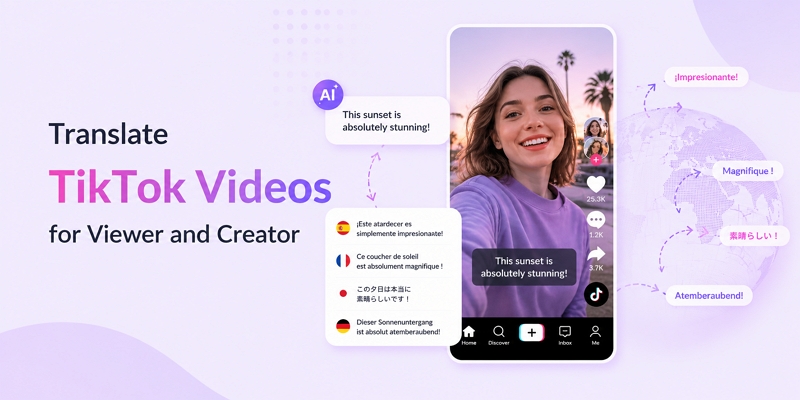
Quick Answer: How to Translate a TikTok Video
There are two ways to translate TikTok videos, depending on whether viewing content or creating multilingual videos.
For Viewers (Translate TikTok Videos in App)
TikTok offers a built-in translation feature for captions, descriptions, and comments.
Step 1: Open TikTok, tab Profile.
Step 2: Tap (…) and click “Language” in Setting and privacy.
Step 3: Select a language you want to translate.
For Creators (Translate TikTok Videos for a Global Audience)
The best method depends on content quality requirements:
- Fast & simple: Use an AI TikTok video translator such as Mediaio Video Translator for automatic subtitles and voice translation.
- Better localization: Combine video editing software with AI dubbing tools for more natural multilingual content.
- Professional quality: For brand campaigns or high-value videos, manual translation and professional dubbing deliver the most accurate results.
Best choice: Built-in translation works for viewers, while creators usually achieve better multilingual reach using AI translation or dubbing workflows. Adopting effective TikTok growth strategies and tools is something TikTok creators must consider.
How to Translate TikTok Video for Viewers(Captions, Comments, and Subtitles)
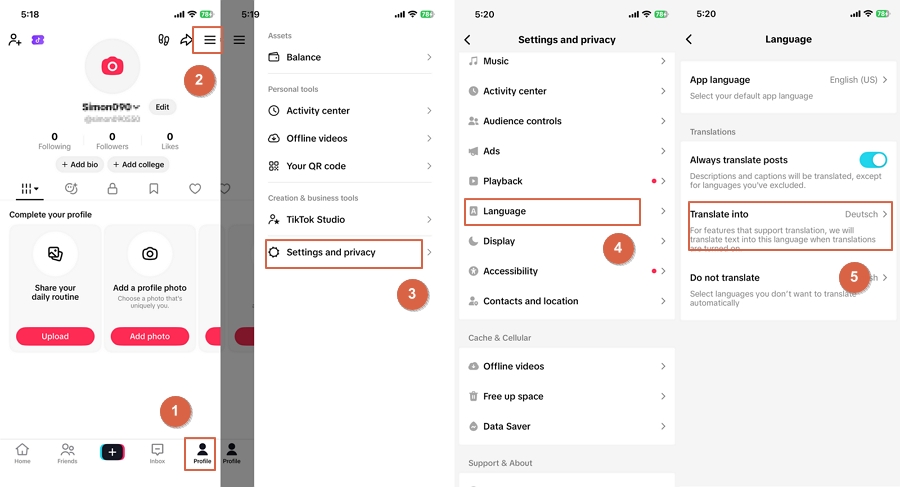
Step 1: Open TikTok App. Then click “Profile”.
Step 2: Tap the three dots (…) on the top right corner. Select “Settings and privacy”
Step 3: Tap Language.
Step 4: Choose your preferred language for better auto-translation.
Step 5: Play the video again. Captions, descriptions, and subtitles should now be easier to read and follow.
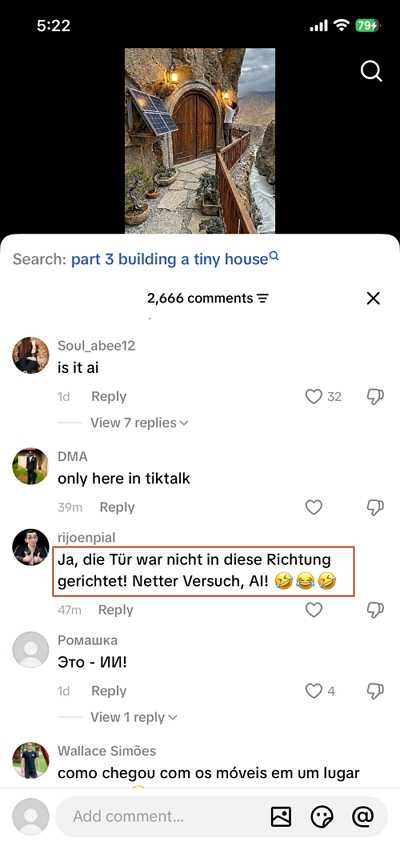
Stet 6: If you want to translate comments individually, long-press a comment. Then tap “Translate”.
Change APP Language VS Translate Into Language
How to Translate TikTok Video for Creators (Subtitle & Dubbing)
What is a creator’s biggest growth lever in 2026? Yes, you’ve guessed it right – “Multilingual Expansion.” You must go beyond subtitle translation to gain more views, followers, and global retention. Today, viewers expect localized voiceovers, consistent vocal tone, and content that feels native to their language – not just readable.
Why multilingual matters in 2026?
- Reach: TikTok’s algorithm increasingly pushes localized content to regional audiences.
- Retention: Viewers connect better and stay longer when they can listen (not just read) in their own language.
- Brand voice consistency: AI dubbing tools now preserve tone, gender, and emotional delivery, keeping your creator identity intact across languages.
Only Subtitle Translation Vs. Subtitle and Dubbing
Why are subtitles alone no longer enough?
- English-speaking markets are saturated. Subtitles help, but they don’t create the native viewing experience TikTok prefers.
- Heavy reliance on subtitles reduces watch time, especially for fast-paced short dramas where viewers don’t want to read.
- TikTok’s content-matching system generally classifies subtitled videos as “foreign content,” limiting its distribution in English-dominant regions.
Comparison: Subtitle-Only Vs. Subtitle + Dubbing (2026)
Method 1: Fast, High-Quality AI Translation + Flexible Editing
This method is ideal for creators who want speed, scale, and control. You needn’t hire a full localization team. After testing over 10 AI video translation tools, the standout translators impress in the following key areas:
- Speed: Translate and dub TikTok videos in minutes, not days.
- Cost-effective translation: Pay per usage instead of per language team.
- Consistent voiceover tonality: Keep a stable, recognizable voice across all languages.
- Perfect Synchronization: Align voiceover, visuals, and subtitles for a natural viewing experience.
- Subtitle editing: Tweak timing, wording, and style after AI translation.
- Batch video translation: Process multiple TikTok clips in one workflow.
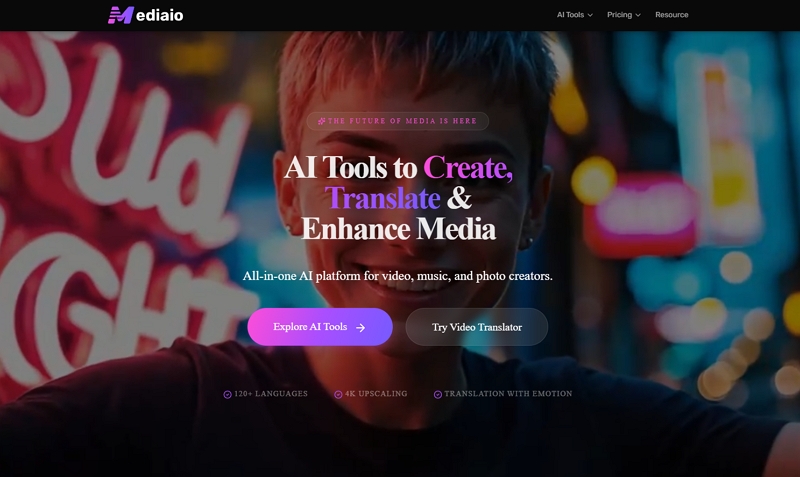
Mediaio Video Translator is one of the premier video translation tools designed specifically for creators seeking to localize their videos into multiple languages. It enables the simultaneous translation of both voiceovers and subtitles for multiple videos, ensuring consistency across the audio tone, subtitles, and visuals. Multi-language translation.
Best for: Short video creators and Mini-drama distributors expanding into multilingual markets
Cost: $1.2 / minute
Pros:
- Multi-speaker voice recognition and dubbing.
- Voice cloning with highly accurate preservation of tone and emotion in video translation.
- Automatic subtitle alignment, with powerful and flexible subtitle editing and adjustment features.
- Flexible video dubbing modifications through text editing only.
- Batch video translation.
- Limited language support at present.
- No lip-sync feature available.
How to Translate a TikTok Video with Mediaio Video Translator
Step 1: Prepare your TikTok video.
Export your TikTok video from the app. You can also use the original file from your phone/editor. Use a high-quality MP4 file for best audio and subtitle accuracy.
Step 2: Upload videos to Mediaio Video Translator.
Go to the Mediaio Video Translator website. Click “Upload Video” and select your TikTok file. Wait for the upload and initial processing to complete.
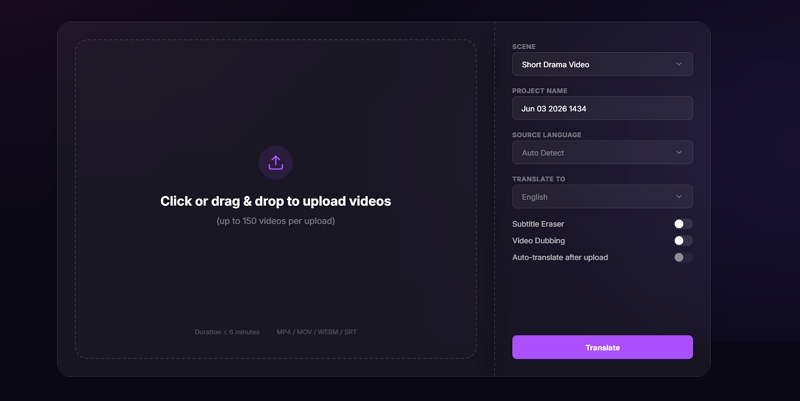
Step 3: Set and Translate Video.
Set the source language (for example, English). Select one target languages (for example, Spanish) based on your growth markets.
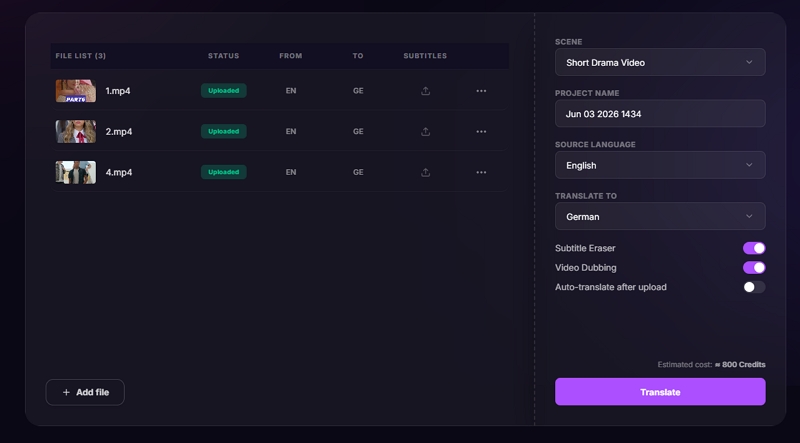
If the original subtitles need to be removed, enable "Subtitle Eraser"; otherwise, both the original and translated subtitles will be retained. To translate subtitles and add dubbed audio at the same time, enable "Video Dubbing."
After completing the settings, click "Translate" to begin.
Step 4: Preview and Edit Video.
Once the video translation is complete, preview and refine the translated video as needed:
- Customize the subtitle style, size, and position to better match the video.
- If a specific dubbed line sounds unsatisfactory, locate the corresponding subtitle, edit the text, and the line will be automatically re-dubbed.
- If a name or term has been translated incorrectly throughout the video, use the batch replacement feature to update it across all subtitles and re-dub the related audio in one step.
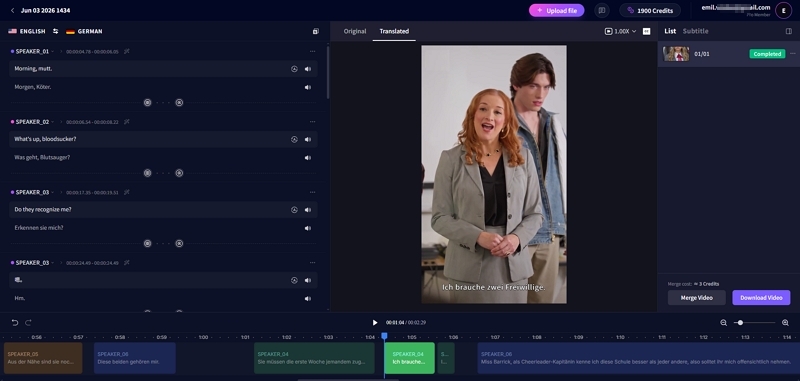
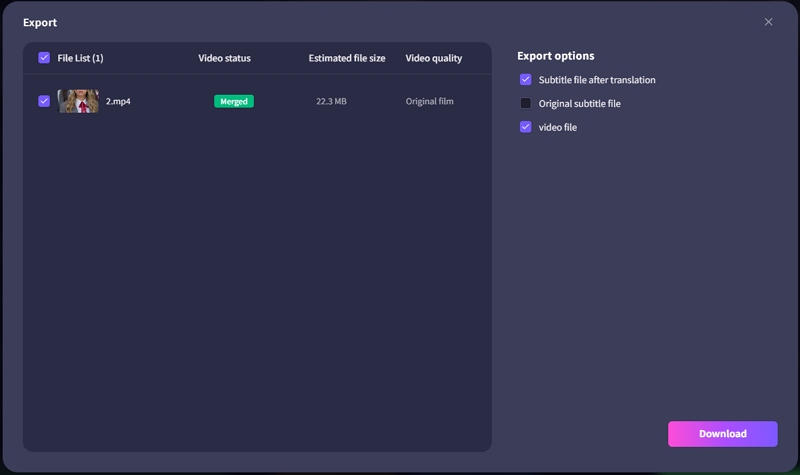
Step 5: Merge or Export.
Click "Merge Video" to perform the final rendering of the translated video. Then, click "Download Video" to save translated video on your computer.
Method 2: Traditional Video Editing Tools + Manual Voiceover
Creators who want maximum control and studio-level polish and are willing to invest more time and money can use this method for TikTok video translation. To complete a video translation, in addition to using video editing tools such as Adobe Premiere Pro and Adobe Audition, you also need to find professional native-speaking voiceover talent.
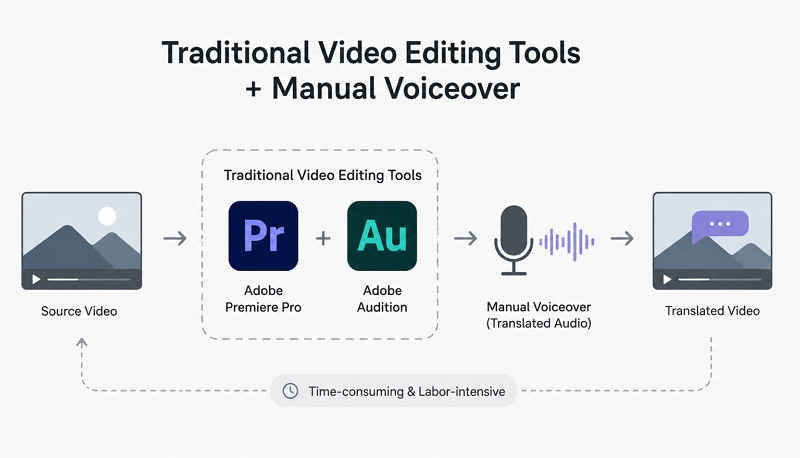
Best for: Brand and corporate promotional videos
Cost:
- Editing Tools:$45.98/month for Adobe Premiere Pro + Adobe Audition.
- Video Dubbing: $80-300/min, this doesn’t include commercial licensing for broadcasting or advertising; otherwise, an additional fee of $300–$500 applies.
Key Focus Areas for High-Quality Translation Using This Method:
- Script accuracy: Clean, culturally adapted translated script.
- Mic technique: Proper distance, plosive control, and consistent volume.
- Room tone,
- Manual subtitle timing
- Professional dubbing
- Commercial License: If the voiceover is intended for broadcast or advertising purposes, an additional fee typically applies.
How to Translate a TikTok Video with Premiere Pro + Audition
Adobe Premiere Pro has an inbuilt AI tool for instant caption translation. Plus, Adobe Audition helps refine your translated audio/video.
Step 1: Transcribe your video. Open the Text panel and import your TikTok video onto your timeline. Click “Transcribe.”
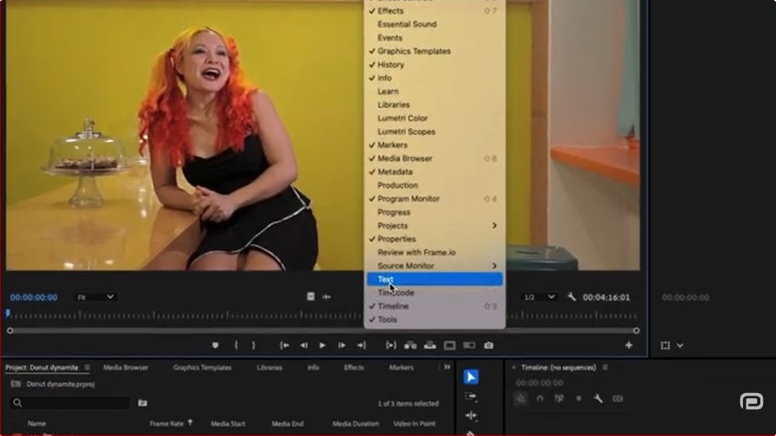
Step 2: Create your captions. Click “Create Captions” and set your format preferences.
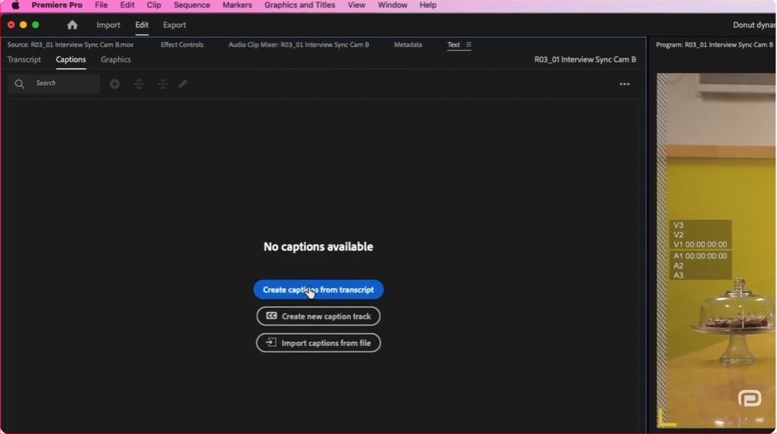
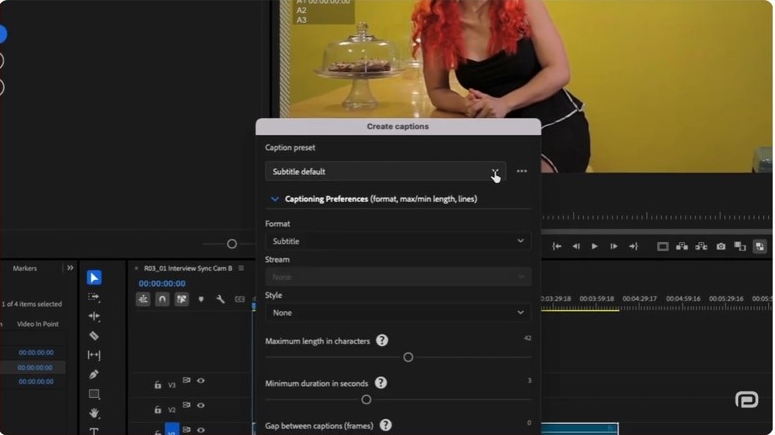
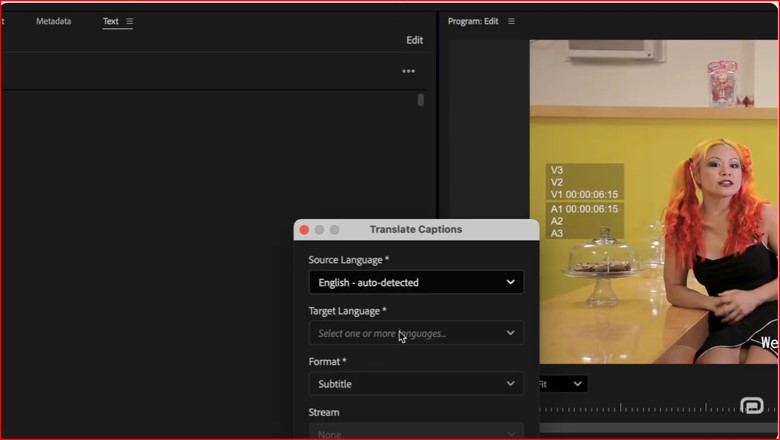
Step 3: Translate the video. Click “Translate” (three dots) icon within the Text panel. Choose your target language and hit “Translate.” Premiere Pro automatically generates a new, synced caption track in the target language.
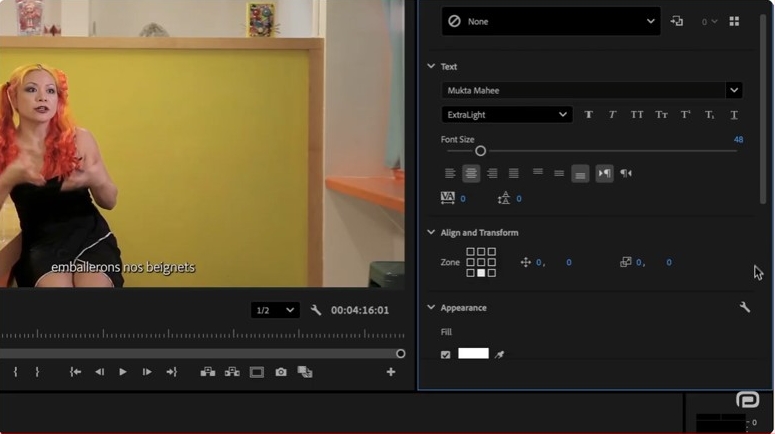
Step 4: Customize your fonts, colors, and backgrounds using the Properties panel.
Step 5: If you want to add AI voiceovers or need high-quality audio mixing, select your audio clip on the timeline and go to “Edit > Edit in Adobe Audition.”
Step 6: Clean up any exported audio using the “Essential Sound panel” in Audition. You can also apply noise reduction and level the dialogues.
Step 7: Generate the translated voiceover, match it for timing and export it back to Premiere pro to replace the original dialogue.
Step 8: Export to TikTok. Go to File > Export > Media.
Step 9: Set your format to H.264.
Step 10: If you want to keep your custom translated subtitles perfectly formatted on the screen, choose “Burn Captions into Video” under the “Captions” tab.
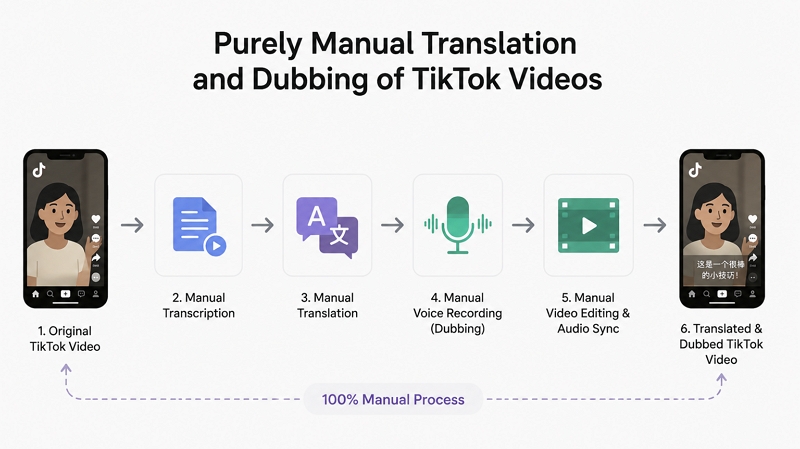
Method 3: Purely Manual Translation and Dubbing of TikTok Videos
This is the highest-effort, highest-quality method. It relies on human translators, voice actors, and editors to recreate your TikTok video for each target language. It’s slow and expensive, but unbeatable for cultural accuracy and premium storytelling.
Best for: TV Commercials, Brand Campaigns, Broadcast-Quality Content
Cost: $500 – 1500/min
Key Focus Areas for High-Quality Translation Using This Method:
- Native translators: Ensure idioms, slang, humor, and emotional tone feel natural.
- Cultural adaptation: Rewrite lines so they fit the target culture, not just the language.
- Multi-speaker casting: Use different voice actors for different characters or genders.
- QC passes: Multiple review rounds for script, timing, audio, and subtitles.
- Commercial licensing: Clearly define the scope of commercial licensing, such as whether it can be used for TV or radio advertising.
Before entering a partnership, all details should be clearly and thoroughly clarified. Some service providers intentionally keep their pricing unclear, so the following points should be specifically confirmed in advance.
How to Choose a Reliable Video Translation Team or Service
Finding a trustworthy video translation provider is not easy. However, checking the following 10 factors can help filter out most unreliable teams and significantly reduce project risks.
- Do they clearly promise 100% human translation? Be cautious of providers that rely heavily on AI or machine translation without human review, especially for commercial or branded content.
- Do they have video localization experience? Video translation is more than translating words. Without localization experience, issues such as awkward direct translations, poorly timed subtitles, unnatural dubbing rhythm, or lip-sync mismatches can easily happen.
- Do they offer native-language translators? Always choose native speakers for the target language. For example, even if someone speaks German fluently, a native German translator will usually deliver more natural wording, cultural nuance, and audience-friendly phrasing.
- Do they have a double QA process? A strong workflow should involve more than one person. Ideally, the process looks like this: Translator → Editor/Reviewer → QA, rather than one translator finishing the work and submitting it directly.
- Do they have industry-specific experience? Every industry has different terminology, tone, and compliance requirements. A team experienced in software, healthcare, finance, or marketing content will usually produce more accurate and natural results.
- Do they use a terminology glossary or style guide? For long-term projects, consistency matters. Brand tone, wording, and terminology should remain the same across videos. A term should not be translated one way in one video and differently in another.
- Do they provide commercial usage rights? Clarify licensing terms before starting the project. This helps avoid unexpected additional fees later, especially for advertising or broadcast use.
- Do they support revisions? Reliable providers typically offer 1–3 rounds of revisions to refine translations, subtitles, or dubbing based on feedback.
- Are they willing to do a sample first? A short sample translation is often the quickest way to evaluate quality. In many cases, it reveals around 80% of a team's real capability.
- Do they have security and confidentiality measures? Professional teams should provide NDAs, file access controls, and clear content retention policies, especially when handling unreleased marketing materials or sensitive business content.
Tool comparison: Best ways to translate TikTok videos for creators
Let’s compare the three methods discussed here using the above parameters.
FAQs about translating TikTok videos in 2026
Not yet. TikTok offers auto-captions and auto-translations for captions, descriptions, and comments, but no built-in AI dubbing. If you want multilingual voiceovers, you must use an external tool, such as an AI video translator, or record dubbing manually.
You have three options: 1. AI tools: Some support multiple voices, but accuracy varies. 2. Traditional editing: Record separate tracks for each speaker. 3. Manual teams: Best for multi-character dramas – use different voice actors for each role. For storytelling or skits, multi-speaker casting dramatically improves authenticity.
Use a workflow that supports manual script editing. 1. AI tools can translate most terms, but you should review and correct jargon. 2. For high-stakes niches, consider native translators or a hybrid workflow (AI + human QC). Accurate terminology improves trust and retention.
Dubbing helps. TikTok increasingly prioritizes localized audio, which boosts: 1. Watch time 2. Completion rate 3. Regional distribution Subtitles alone may classify your video as “foreign content,” limiting reach in English-speaking markets. Dubbing makes your video feel native, which the algorithm prefers.
For viewers: TikTok’s built-in Translate for captions, descriptions, and comments. For creators: CapCut is the best free tool for basic translation plus auto-captions. However, free tools lack voice cloning, emotional dubbing, and batch translation, so they’re best for simple content – not multilingual growth strategies.